

Let’s be direct: when you search for a free auto clicker, the first ten results are a minefield. The legitimate tools are buried under a pile of ad-infested clone sites, fake “virus-free guaranteed” download pages, and Reddit threads that go in circles. Downloading the wrong file does not just give you an annoying toolbar — it gives you a keylogger.
In this guide, we have cross-referenced Reddit’s r/antivirus and r/pcmasterrace communities, SourceForge’s project listings, and VirusTotal scan data to give you the definitive, no-nonsense answer on which auto clicker is actually safe to use in 2026.
(If you are in a rush, here is the TL;DR.)
- OP AutoClicker from SourceForge is safe. Antivirus flags are false positives — not actual malware.
- The danger is not the software. The danger is the dozens of fake clone sites that impersonate legitimate tools.
- For Mac users: A macOS version is available at opautoclicker.com
- For Roblox users: Use a randomized click interval, not a fixed one, to avoid in-game anti-cheat detection.
What Is an Auto Clicker?
An auto clicker is a lightweight utility that automates repetitive mouse clicks at a configurable speed and location on your screen. The use cases are broader than most people assume:
- Idle & Clicker Games: Cookie Clicker, Clicker Heroes, Roblox idle farming modes
- Developer Testing: UI stress testing, form automation, and QA workflows
- Accessibility: Users with repetitive strain injuries or mobility impairments use auto clickers to reduce physical strain
- Roblox Grinding: Automating repetitive in-game actions like resource collection during long farming sessions
The tools themselves are legal in every jurisdiction. Their legitimacy depends entirely on how you use them.
Is OP Auto Clicker Safe?
This is the question that drives 720+ upvote Reddit threads. The honest, direct answer: yes, when downloaded from the official SourceForge project page. Here is the reasoning backed by evidence.
1. The source code is public. OP Auto Clicker is open-source. Every line of its code is visible on its repository. A keylogger or remote access tool cannot be hidden inside publicly visible, audited code.
2. SourceForge is a vetted repository. SourceForge has hosted open-source software since 1999. It is not a random file-sharing site. Their team scans uploaded files and their platform reputation depends on not hosting malware.
3. Antivirus alerts are false positives. Windows Defender and third-party antivirus engines routinely flag auto clickers as “Potentially Unwanted Programs” (PUPs). This happens because intercepting and simulating mouse events is technically the same behavior as certain types of spyware. The engine cannot tell the difference based on behavior alone. If you want to verify this yourself, upload the downloaded .exe to VirusTotal.com and check the result across 70+ engines.
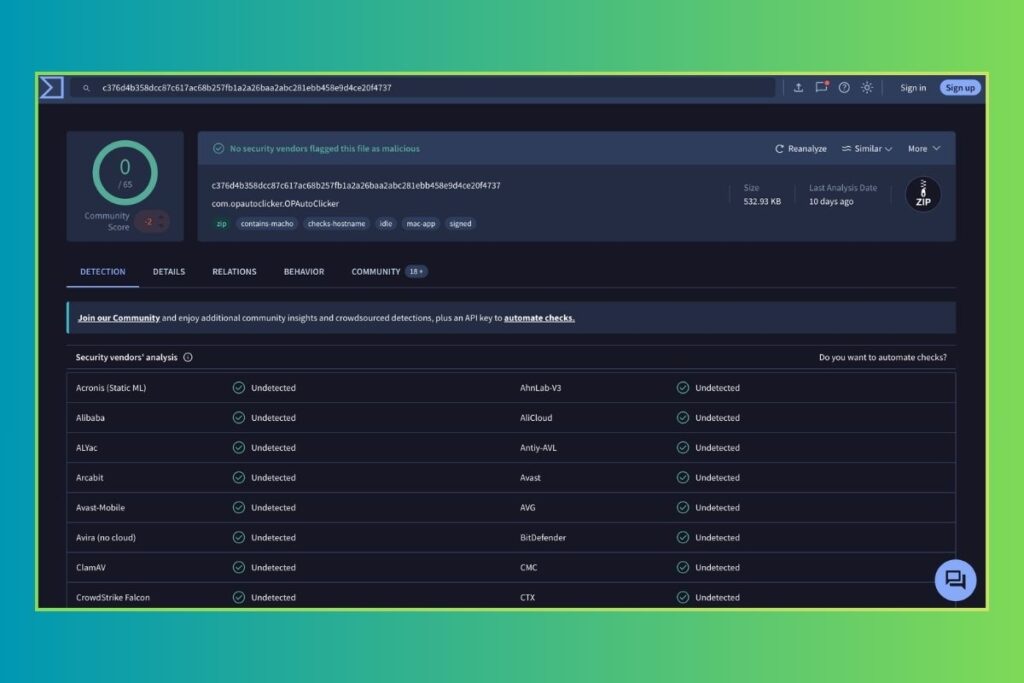
WARNING
The only real danger is downloading from the wrong site. Searching “OP Auto Clicker download” in Google will surface multiple clone sites that look identical to the real thing but bundle actual malware. The official tool lives exclusively at SourceForge. Do not download it from anywhere else.
Top 5 Verified Safe Auto Clickers (2026)
| Tool Name | Platform | Best For | Safety |
|---|---|---|---|
| OP Auto Clicker | Windows | Roblox, Cookie Clicker, general use. Simple interface, highly configurable. | ✔ Verified Safe |
| MacOS Auto Clicker | Mac | Best choice for Apple users on Big Sur, Ventura, and Sonoma. Built with SwiftUI. | ✔ Verified Safe |
| Paul’s AutoClicker | Windows | Power users needing a macro recorder + auto clicker combo. Can click as fast as your CPU allows. | ✔ Verified Safe |
| AutoHotkey Script | Windows | Developers and advanced users who want full control via a custom scripting language. | ✔ Verified Safe |
| Fast Mouse Clicker | Windows | Incremental games. Widely recommended on r/incremental_games for its reliability. | ✔ Verified Safe |
How to Download OP Auto Clicker Safely
Follow these steps precisely to avoid landing on a clone site:
- Open your browser and go directly to SourceForge.net — do not click any Google or Bing ads above the organic results.
- Search for “AutoClicker” in SourceForge’s internal search bar.
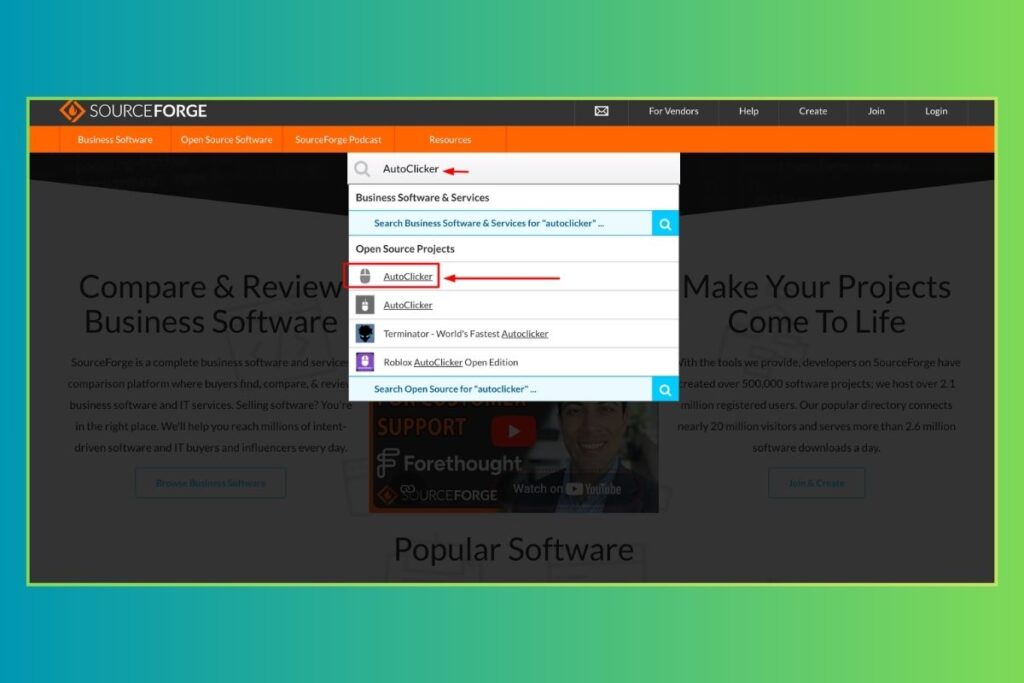
- Navigate to the official project. The URL should read: sourceforge.net/projects/orphamielautoclicker/
- Click the green Download button. The installer is under 5MB.
- Before running: right-click the downloaded .exe file and select “Scan with Windows Defender” or your antivirus. Any alert will be a false positive, but this is good practice.
- Install, configure, and launch.
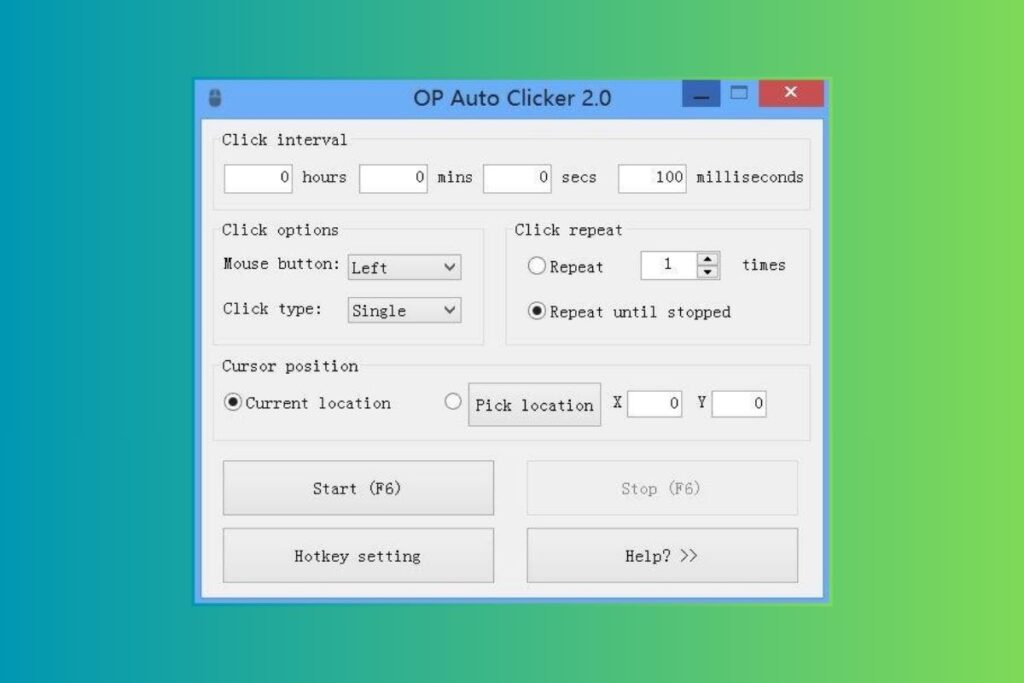
How to Use OP Auto Clicker (Settings Guide)
The interface is deliberately minimal. Here is what each setting does:
- Click Interval: The gap between each automated click. For Roblox farming, 100ms is a reliable starting point. For Cookie Clicker, you can lower it to 10–20ms.
- Click Type: Left Click, Right Click, or Middle Click.
- Click Repeat: Toggle between infinite repeat or a fixed number of clicks.
- Hotkey Toggle: F6 by default to start and stop. This is fully customizable.
- Location Mode: “Current Cursor Position” follows your mouse. “Fixed Location” clicks one specific pixel permanently.
Recommended Settings by Use Case
The default settings work fine for basic use, but here are optimized presets depending on what you’re actually doing:
- For Cookie Clicker / Idle Games: Set Click Interval to 10ms, Click Type to Left Click, Location Mode to Fixed (aim at the big cookie), and Repeat to infinite. This fires at maximum effective speed for cookie games without triggering any detection — Cookie Clicker has no anti-cheat.
- For Roblox Farming: Set Click Interval to a randomized range between 85ms–115ms if your version supports random intervals, or 100ms fixed as a baseline. Use the current cursor position so you can move your character while it clicks. Set a fixed repeat count (e.g., 500 clicks) rather than infinite to simulate more natural play sessions.
- For Accessibility Use: Set Click Interval to 500ms–1000ms, Repeat to infinity, and configure Fixed Location to reduce the need to move the cursor physically. This effectively turns the mouse into a single-button input device for users with limited hand mobility.
- For Developer UI Testing: Use Fixed Location mode on specific UI elements. Set click count to a high number (e.g., 10,000) and let it stress-test buttons, form fields, or scroll areas at 50ms intervals to identify crashes, memory leaks, or rendering bugs.
Auto Clicker for Roblox: Will You Get Banned?
Roblox’s platform itself does not issue automatic bans for running an external auto clicker. However, individual games can and do implement their own anti-cheat systems. The risk level depends on how you configure the tool.
A perfectly fixed click interval (e.g., exactly 100ms every single time) produces a mathematically impossible pattern for a human. Anti-cheat engines are specifically trained to flag this inhuman regularity. The solution is simple: use a randomized interval. Configure your auto clicker to fire randomly between 85ms–115ms. This range mimics natural human clicking variation and is effectively invisible to pattern-detection algorithms.
Using an auto clicker to exploit in-game bugs (item duplication, currency farming that breaks game economies) is a separate issue and is a clear Terms of Service violation regardless of the tool.
The Games That Actively Detect Auto Clickers
Not every Roblox game treats automation the same way. Here is a breakdown of the risk levels across the most popular games:
- Blox Fruits: Has a moderate anti-cheat system. Fixed-interval clicking at high speeds (sub-50ms) in combat will get you flagged. For fruit farming on NPCs, 200ms+ randomized is generally safe.
- Anime Defenders / Tower Defense games: Very low detection risk. These games involve clicking UI buttons, not combat mechanics. Auto clickers are widely used in these genres without bans.
- Pet Simulator X: Moderate risk. The game economy is sensitive to exploits, and the developer has actively patched several automation methods in 2024–2025. Proceed carefully.
- Brookhaven / Roleplay games: Zero anti-cheat. Auto clickers are irrelevant here in any meaningful way.
The general rule: the more competitive or economy-sensitive a game is, the more aggressively it monitors for automated patterns.
Windows Defender False Positives: What to Do
This is one of the most frustrating experiences for new auto clicker users. You download OP Auto Clicker from SourceForge, and the moment you extract the file, Windows Defender quarantines it and throws a “Trojan” or “HackTool” warning.
Do not panic. Here is exactly what is happening and how to resolve it:
Why it happens: OP Auto Clicker’s core function requires it to hook into Windows’ low-level input APIs to intercept and simulate mouse events. This is the exact same API layer that keyloggers and certain remote access tools use. Windows Defender uses heuristic analysis — it sees the behavior pattern, not the intent, and flags it categorically.
How to verify it is safe: Before adding any exceptions, upload the .exe file to VirusTotal.com. It will scan the file against 70+ antivirus engines simultaneously. If the result shows 0–3 detections from fringe engines (not major ones like Kaspersky, Bitdefender, or Malwarebytes), it is a confirmed false positive.
How to restore the file and add an exclusion:
- Open Windows Security → Virus & Threat Protection → Protection History
- Find the quarantined OP Auto Clicker file and click Restore
- Go to Virus & Threat Protection Settings → Add or Remove Exclusions
- Click Add an Exclusion → Folder → Select the folder where you installed OP Auto Clicker
- Windows Defender will no longer scan or quarantine files in that folder
This is the same process gamers use when Windows Defender incorrectly flags cracked game files or modding tools.
How to Spot a Fake Auto Clicker
The majority of search results for “auto clicker download” are not what they claim to be. These are the red flags:
1. Suspicious Domain Names
Sites operating under domains like autoclicker-free-download.com, op-autoclicker.net, or any hyphenated variation of a known tool’s name are almost universally malicious clones. Legitimate open-source tools live on SourceForge or GitHub — not on commercial-looking download portals.
2. Abnormal File Size
OP Auto Clicker is under 5MB. Paul’s AutoClicker is similarly compact. If a download page claims to offer an auto clicker inside a 50MB+ installer, the extra bulk is bundled adware, browser hijackers, or worse.
3. Account Registration Requirements
Not a single legitimate free auto clicker requires you to create an account or enter your email address to download it. Any site imposing this requirement is harvesting credentials.
4. “Undetectable” or “Anti-Ban” Claims
Websites marketing an “undetectable auto clicker for Roblox” or “guaranteed anti-ban auto clicker” are preying on users who are already worried about getting flagged. These tools do not exist. Such sites exist solely to exploit the anxiety of their target audience.
5. Redirect Chains Before Download
If clicking the download button triggers a chain of URL redirects — sending you through three or four different domains before the download starts — close everything immediately. This behavior is characteristic of malicious ad networks.
Frequently Asked Questions
No. The OP Auto Clicker downloaded from SourceForge is not a virus. Antivirus engines flag it as a PUP because its core behavior — intercepting and simulating mouse events — is technically identical to how certain spyware operates. The engine cannot distinguish intent from behavior alone. Upload the file to VirusTotal.com to confirm it clears across 70+ independent scanning engines.
No. OP Auto Clicker is a Windows-exclusive application. Mac users should install MacOS Auto Clicker, which is hosted on both SourceForge and GitHub and was specifically built for Apple’s macOS environment using Swift and SwiftUI.
The theoretical ceiling is processor-dependent. In benchmark tests, OP Auto Clicker has recorded upward of 50,000 clicks per minute at maximum speed. For gaming purposes, most users operate between 500 and 2,000 clicks per minute to maintain detection-resistant click patterns.
No. Auto clicker software is legal. Its legal status depends entirely on the context in which it is used. Using one to automate accessibility tasks, idle games, or developer testing is entirely legitimate. Using one to manipulate online competitive games in a way that violates a game’s Terms of Service is a separate matter governed by that game’s rules, not criminal law.
Legal Disclaimer: TheLisTree does not encourage the use of auto clickers to violate any platform’s Terms of Service or to gain unfair advantages in competitive gaming environments. This guide is for informational and educational purposes only.