
Leaf Browser Alpha is widely considered the pioneer of tree-style tab management and radical browser multitasking. Even after its discontinuation, it continues to be one of the most sought-after “unblocked” browsers for school Chromebooks in 2026.
| Feature | Details |
|---|---|
| Developer | Sam Lanning |
| Initial Release | May 11, 2016 |
| Core Tech | Chromium / Webview Tags |
| Primary Use | Advanced Multitasking & School Filter Bypass |
| 2026 Status | Discontinued (Legacy Project) |
What exactly is Leaf Browser Alpha?
Originally developed as an experimental Google Chrome app by Sam Lanning in 2016, Leaf Browser was designed with a single goal: radical multitasking.
Official Links and Resources
Are you in search of the official Leaf Browser Alpha repository? Here are the primary resources for those researching this legacy project:
- Official GitHub Repository: github.com/s0/leaf-browser
- Legacy Chrome Web Store (Reference): Leaf Browser Alpha on Web Store
Unlike Chrome or Safari, which keep everything in a single, heavyweight window, Leaf Browser lets you open multiple independent, floating browser windows. These windows were not just tabs—they were isolated browsing sessions that you could resize and place anywhere on your screen.
2016 Origins: The Birth of a Productivity Giant
Leaf Browser Alpha was first released on the Google Chrome Web Store on May 11, 2016. Created by developer Sam Lanning, it was never intended to be a mainstream rival to Chrome. Instead, it was an experimental UI project designed to solve a very specific problem: Tab Overload.
At a time when Chrome was notorious for eating RAM, Leaf Browser introduced a system that felt like science fiction. It was built as a Google Chrome “app” using advanced webview tags—a technology that allowed it to render websites in isolated, lightweight containers.
The Secret Features that Defined an Era
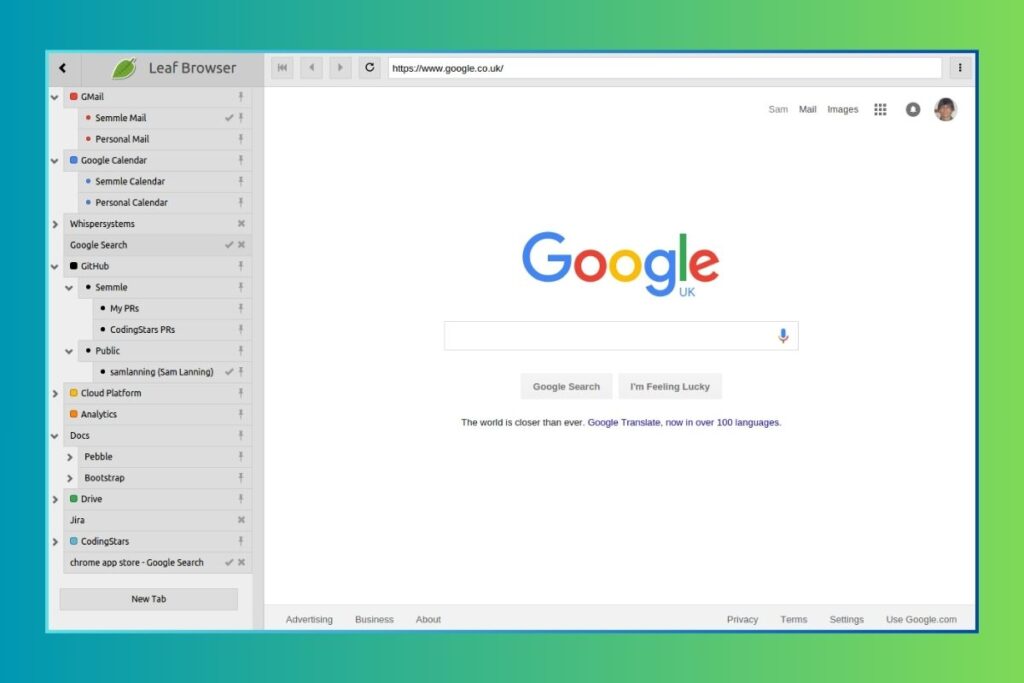
1. The Hierarchical Tree System
Most browsers today use horizontal tabs. Leaf Browser used a vertical tree. This was not just for aesthetics; it allowed for a “mother-daughter” relationship between tabs.
- If you were researching “Web Design,” you could have a Parent tab for your main site and nested Child tabs for every reference link you opened.
- This allowed power users to manage 100+ tabs in a single sidebar without the browser slowing down.
2. Manual Memory Unloading (RAM Magic)
In 2016, “memory-saving” features were nonexistent in mainstream browsers. Leaf Browser allowed users to manually “unload” any tab. The tab would remain in your list, but its background process would be terminated, releasing 100% of the RAM it was utilizing. This is the exact technology Google only perfected in Chrome around 2023–2024.
3. The “Unrealized” Roadmap: Multi-User Sessions
One of the biggest “secrets” buried in the Leaf Browser archives is Sam Lanning’s roadmap. He planned to allow users to switch between different “user profiles” for individual tabs. This would have allowed you to log in to two different Gmail or Facebook accounts in the same window—a feature currently available only in premium “Anti-Detect” browsers used by professionals.
The School Legend: Why Students Still Search for Leaf Browser
The biggest driver of Leaf Browser’s traffic in 2026 is students looking for an unblocked browser for school. If you look at Google search data for this topic, you will see a massive spike in searches related to bypassing Chromebook restrictions.
How it Bypassed GoGuardian:
School network filters like GoGuardian and Lightspeed are designed to monitor Chrome tabs. Leaf Browser essentially created a “browser within a browser” by using the webview tag within a Chrome app.
- The filters would see the “Leaf Browser App” as an approved productivity tool.
- The content inside Leaf Browser was often invisible to the monitoring software because it was rendered in an isolated process.
This rendered it the ideal solution for students using restricted Chromebooks. Even today, “Leaf Browser clones” appear on the Web Store daily, attempting to replicate this 2016 exploit.
Technical Breakdown: Why It Is Broken in 2026
Many users are frustrated that they can no longer find or run the official Leaf Browser. There are two technical reasons for this:
- Chrome Apps Phase-Out: Google officially ended support for legacy Chrome Apps on Windows and Mac to move everyone toward Web Extensions.
- Security Standards: Modern websites now use “SameSite” cookie policies and advanced encryption that the 2018-era Leaf engine cannot process. Using it today would result in broken layouts and “SSL Connection Errors.”
Modern 2026 Alternatives: The Successors
If you are looking for the “Leaf Browser Experience” without the security risks, here are the leaders in 2026:
- Horse Browser: The most direct “spirit” successor. It uses the same hierarchical organization and productivity focus.
- Vivaldi: The best for those who loved the Leaf sidebar and manual memory management.
- Google Chrome 2026: With its new native vertical tabs, it is finally a viable alternative for casual users, even if it lacks the deep “mother-daughter” nesting.
2026 Update: Did Google Chrome Finally Kill Leaf Browser?
In April 2026, Google made waves by officially releasing native vertical tabs for the stable version of Chrome. Users can now right-click and select “Show Tabs Vertically” to move their tab strip to the left sidebar.
The “Management Gap”: Layout vs. Logic
While Chrome has caught up in terms of layout, it still lacks the logic that made Leaf Browser a power-user favorite. Understanding this gap is the real secret to pro-level productivity:
- Layout (Chrome 2026): Simply moves your tabs to the side. It helps you see titles better, but it is still just a “flat” list.
- Management (Leaf Browser Alpha): Created a “tree” where tabs were connected logically. If you closed a parent tab, you could choose what happened to its child tabs. This is context management, not just a UI change.
Even today, power users who manage hundreds of tabs find that Chrome’s native 2026 update is a good “clean” solution for casual browsing, but it cannot replace the deep organizational DNA of Leaf Browser or its modern successors like Horse Browser.
Final Verdict
Leaf Browser Alpha was a masterpiece of minimalism and performance. It taught the tech world that a browser should adapt to the user, not the other way around. While the original app is now a piece of digital archaeology, its DNA lives on in every modern productivity browser we use today.
Pro-Tips for TheLisTree Readers:
- Don’t search for “Leaf Browser Unblocked” on the Web Store. Most of these are fake apps designed to show you ads.
- Use Vivaldi or Horse Browser if you truly need tree-style tab management.
- The Tree Sidebar: A screenshot showing tabs organized in a hierarchy (from the GitHub link provided).
- Floating Windows: A shot of a desktop with 2-3 small Leaf windows open over a main document.
- Chrome 2026 UI: A screenshot of the new “Native Vertical Tabs” in Chrome 2026 (Search for “Chrome 2026 vertical tabs native UI”).
- The “Secret” Search: A shot showing how clones of Leaf Browser appear today.
- Original Developer Credit: A small shot of Sam Lanning’s GitHub repository to show authority.
- Keep an eye on original developer Sam Lanning’s GitHub to see how modern web apps still use his early concepts.